How much does manual Excel work cost a business?
A spreadsheet task that takes only a few hours may not look expensive. The real cost appears when the same work is repeated every week or month, by multiple employees, with additional time spent checking errors and rebuilding reports.
A simple way to calculate the labor cost
Start with the employee time directly consumed by the task. A useful first calculation is:
This does not need to be a perfect accounting calculation. Its purpose is to determine whether the problem is large enough to justify a closer look.
| Example | Hours | Frequency | Labor assumption | Direct annual cost |
|---|---|---|---|---|
| Weekly spreadsheet cleanup | 3 hours | 52 times/year | $35/hour | $5,460 |
| Weekly report preparation | 8 hours | 52 times/year | $35/hour | $14,560 |
| Department-wide recurring work | 20 hours | 52 times/year | $35/hour | $36,400 |
Illustrations only. Use your own labor rate, frequency, and time estimates.
The hourly cost is only the visible part
Manual spreadsheet work often creates costs that do not appear in the first calculation. Common examples are rework, error correction, management review, delayed information, and dependence on one employee who understands the process.
Errors and rework
A wrong formula, missing row, duplicated record, or incorrect copy-and-paste can require additional time to find and correct.
Management review
Managers often spend time checking a manually prepared report because the process itself does not provide reliable controls.
Delayed decisions
If a report is available later because someone has to assemble it manually, the business cost may be larger than the labor spent creating it.
Key-person dependency
If only one employee knows the sequence of files, formulas, and adjustments, the process becomes difficult to transfer or cover.
Which Excel tasks are most worth reviewing?
- They happen repeatedly. Daily, weekly, monthly, or every time a certain transaction occurs.
- The inputs are similar. The same type of CSV, Excel workbook, PDF, or system export appears each time.
- The rules are recognizable. Employees repeat the same matching, cleanup, calculations, filters, or exception checks.
- The output is predictable. The finished report, workbook, reconciliation, or exception list follows the same structure.
A five-minute automation screening test
| Question | What to capture |
|---|---|
| How often is it performed? | Daily, weekly, monthly, quarterly, or per transaction. |
| How much employee time does one run require? | Include preparation, processing, checking, and cleanup. |
| How many people touch the process? | Include reviewers and approvers. |
| What files or systems are involved? | Excel, CSV, PDF, ERP exports, ecommerce exports, accounting reports, email attachments, etc. |
| What mistakes or exceptions occur? | Duplicate rows, mismatches, wrong prices, missing invoices, manual corrections, late reports. |
Example: a monthly reconciliation
Suppose an employee spends five hours each month downloading two reports, standardizing them, matching records, investigating missing items, and preparing an Excel summary.
At a loaded labor rate of $35 per hour, the direct annual labor cost is $2,100. That alone may or may not justify a custom tool. But the calculation changes if the process also requires manager review, creates month-end delays, or has to be repeated for several business units.
Automation does not have to mean replacing Excel
For many companies, Excel remains a useful output. The opportunity is often to automate the repetitive work before the workbook is delivered: reading source files, cleaning data, matching records, applying calculations, flagging exceptions, and creating the finished Excel or CSV file.
That pattern appears in WorkOffload examples: system reconciliation, invoice exception checking, and import-document reconciliation followed by creation of a standard wire-transfer workbook.
A real example: 24 labor hours reduced to 30 minutes
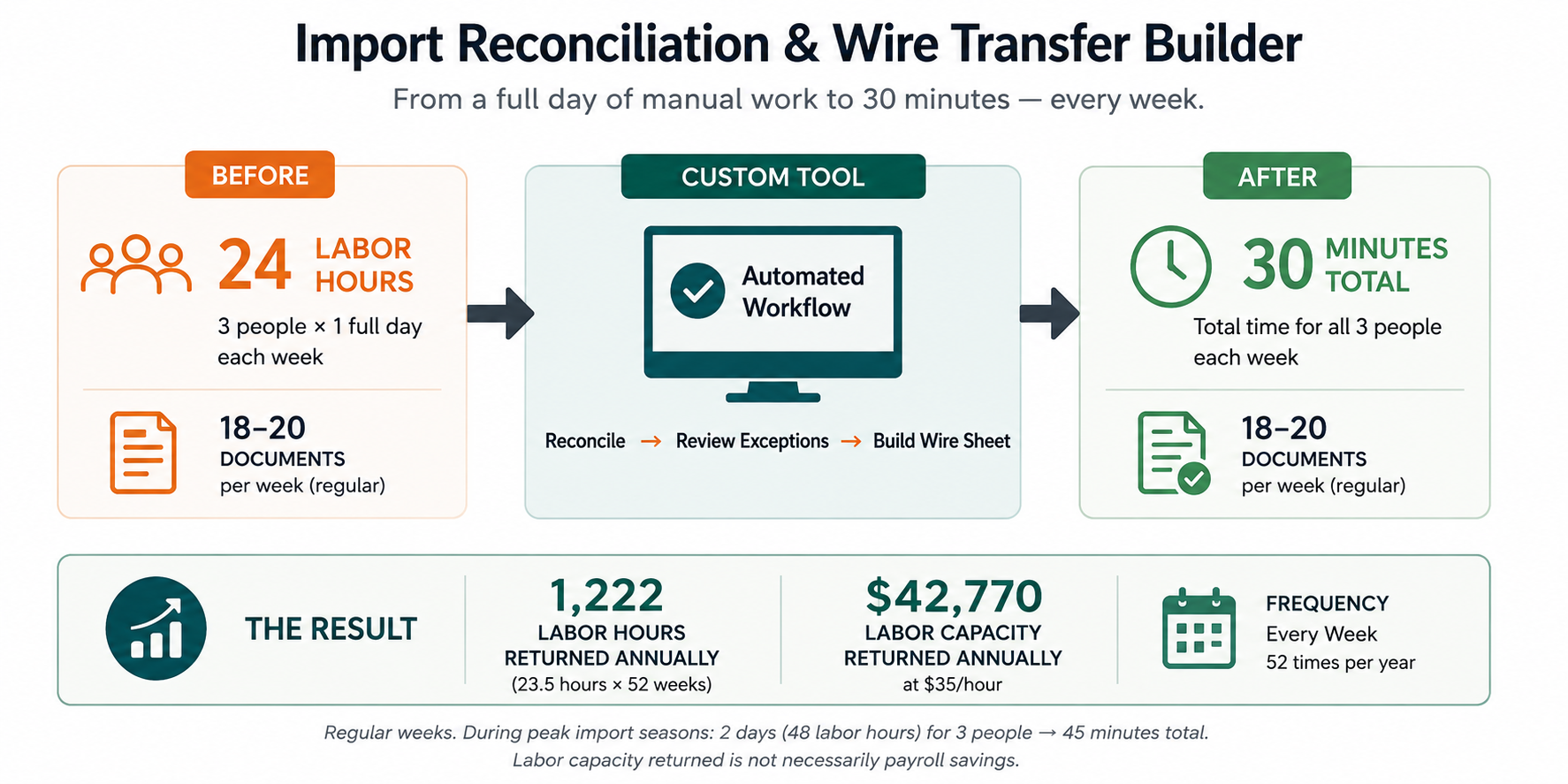
For a regular import-reconciliation week, three people previously spent about one 8-hour workday each on the process. The tool-assisted workflow reduces the total employee time to about 30 minutes while handling roughly 18–20 documents.
What this looks like with real repetitive workflows
The examples below use an 8-hour workday, a 40-hour workweek, and a $35 loaded hourly labor cost. The time figures are approximate and are based on the actual workflows represented in the WorkOffload case studies.
| Workflow | Before | After | Frequency | Approx. labor hours returned/year | Approx. labor value/year |
|---|---|---|---|---|---|
| Shopify reconciliation | 2 workweeks = 80 hours | 0.5 hour | Monthly | 954 hours | $33,390 |
| UPS invoice checking | 4 workdays = 32 hours | 0.5 hour | Monthly | 378 hours | $13,230 |
| Import reconciliation — regular week | 1 day × 3 people = 24 labor hours | About 0.5 total labor hour to complete | Weekly | 1,222 hours | $42,770 |
Annualized estimates: (manual labor hours − new labor hours) × annual frequency × $35/hour. They represent labor capacity returned to the business, not guaranteed cash savings.
Peak import weeks
During peak import periods, the import-reconciliation process can involve roughly 50–75 documents instead of the normal 18–20. The manual process can expand to about two 8-hour days for three people, or approximately 48 labor hours. The tool-assisted workflow is estimated at about 45 minutes. That is roughly 47.25 labor hours returned in a peak week, with an illustrative labor value of about $1,654 per peak week at $35/hour. Because the number of peak weeks varies, this figure is not annualized here.
What does ROI mean in plain language?
ROI means return on investment. For this type of work, the first question is simpler: How much employee time and labor value does the current process consume, and how much of that could a tool give back?
The calculator below does not tell you what a custom tool should cost. It gives you a quick estimate of the annual labor capacity tied up in the current process and the value of the time that could potentially be returned.
Repetitive Work Savings Calculator
“Loaded hourly labor cost” is an estimate of what an employee hour costs the business. The default is $35/hour. Change it to fit your business. This calculator estimates labor capacity only; it does not include error reduction, faster decisions, or other benefits.
When does a custom tool make financial sense?
There is no universal dollar threshold. A tool becomes worth evaluating when the value of the repetitive labor, errors, delays, or control problems is meaningful compared with the effort required to build and maintain the solution.
A useful screening question is: If this process returned hundreds of employee hours each year, what would those employees be able to do instead? The answer may be faster month-end work, more supplier follow-up, more analysis, fewer errors, or simply avoiding additional administrative workload as the business grows.
Questions businesses commonly ask
How many hours should a task consume before automation is worth considering?
There is no single threshold. Frequency, error risk, labor cost, process complexity, and the cost of the solution all matter.
Does automation require replacing our current software?
No. Many useful projects work with exports from systems a business already uses.
Should we automate a process that still requires judgment?
Often the repeatable portion can be automated while exceptions remain with an employee.
What information is needed to estimate savings?
Start with frequency, employee time, number of people involved, approximate loaded hourly cost, review time, and rework.